


Table of Contents
Introduction: What is Stellar AIO?
If you regularly try to buy high-demand items online—like sneakers, consoles, GPUs, or trading cards—you’ve probably noticed how fast they disappear. Drops go live, pages lag, carts fail, and by the time checkout loads, everything’s already gone. Stellar AIO is built for people in that exact situation, helping automate the buying process across multiple online stores so you don’t have to rely on perfect timing or nonstop refreshing every time something restocks.
At its core, Stellar AIO is presented as a tool that’s supposed to help users stay ready when products suddenly drop or restock. The idea is that you set things up ahead of time, and the bot claims to handle tasks like watching product pages, running multiple checkout attempts, and working across several stores at once. These are things that can be tough to manage manually, especially during busy drops, which is why the tool often catches the attention of resellers, collectors, and dedicated hobbyists who deal with limited releases on a regular basis.
This Stellar AIO review walks through how the bot works, what users tend to like about it, some commonly discussed limitations, and who it’s best suited for—helping you decide whether it’s a good fit for your needs.
1. Stellar AIO at a Glance
What It Is?
Stellar AIO is an automation bot built to handle specific steps of the online checkout process across multiple supported retailers from a single dashboard. From a technical standpoint, it works by running automated tasks that monitor product pages for availability changes and then attempt to add items to cart and complete checkout based on pre-configured settings like profiles, payment details, and proxies.
Who It’s For?
It’s best for people who want to grab limited-edition or fast-selling items, like consoles, trading cards, or other collectibles. Beginners can use it, but there’s a bit of setup involved.
Where It Works?
Stellar AIO supports a wide range of major retail sites and regional marketplaces — including big names like Amazon, Walmart, Target, Best Buy, The Home Depot, and Pokémon Center, and some Shopify‑based stores. It also works in regions beyond the U.S., covering Canada, the UK, Japan, and the EU.
How You Access It?
You need a license to use Stellar AIO, which is managed through official platforms. Pricing varies depending on the plan and availability, which we break down later in this review. (see pricing & discounts)
2. How Stellar AIO Works: Step-by-Step
Understanding how Stellar AIO works will help you get the most out of it — and avoid common pitfalls that new users often face. Here’s a clear, step-by-step overview of what to expect,
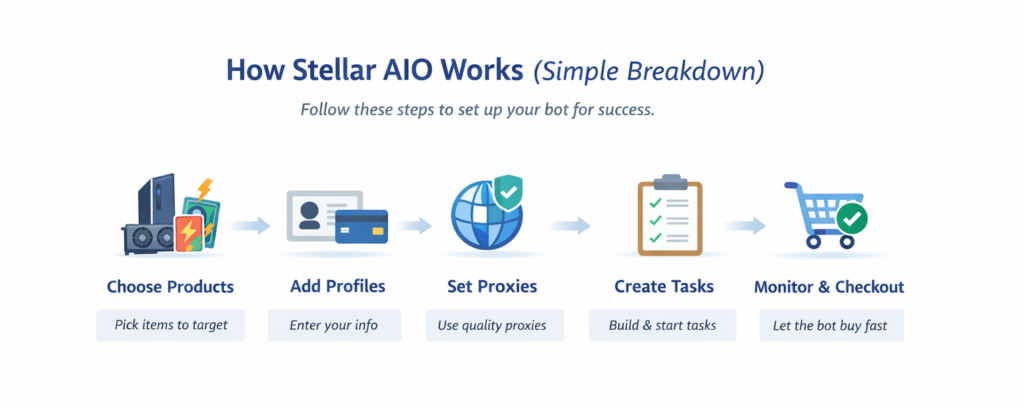
i. Choose Products
The first step is simply picking what you want Stellar AIO to go after. This usually means adding the product you’re interested in—like a console, GPU, trading cards, sneakers, or another fast-selling item—using its product link. For beginners, this is where keeping things simple really helps.
One thing new users often run into is choosing the wrong type of product link or targeting a store the bot doesn’t fully support. When that happens, tasks may not start at all or might fail without much feedback, which can be confusing early on. It’s usually best to start with well-known retailers that tend to work more consistently, such as Best Buy, Walmart, Target, Amazon, or Pokémon Center.
A good approach is to double-check the product URL, run a single test task first, and only add more tasks once you’re sure everything is set up correctly.
ii. Add Profiles
Profiles store your billing, shipping, and payment details so Stellar AIO can handle checkout automatically. Think of them like digital forms that the bot fills in for you during a drop.
How to add a profile in Stellar AIO:
- Go to the Profiles section in the Stellar AIO dashboard.
- Click Add New Profile.
- Fill in your billing and shipping information carefully. Make sure it matches the region and store you plan to target.
- Enter your payment details and any additional fields required by the store.
- Save the profile and run a test task to make sure it works before using it for multiple items.
A common issue is entering incorrect information, leaving fields blank, or using payment types that don’t match the store. When that happens, checkout tasks can fail or get declined, which can be frustrating.
To avoid problems, make sure your profiles are complete, accurate, and match the region or store you’re targeting. It’s usually best to start with a few profiles, test them, and then expand as you get more comfortable with the setup.
iii. Set Proxies
Proxies work like different “internet identities” for your bot. Each proxy gives Stellar AIO a unique IP address when it communicates with a store, which helps prevent the site from detecting multiple requests coming from the same computer. Using proxies can improve your chances of success, especially when running multiple tasks or targeting high-demand items.
How to add and assign proxies in Stellar AIO:
- Go to the Proxies section in the Stellar AIO dashboard.
- Click Add New Proxy and enter your proxy details (IP, port, username, and password if required).
- Group your proxies into a proxy pool. This allows you to assign multiple proxies to different tasks efficiently.
- When creating tasks, select the proxy pool you want each task to use. Make sure proxies match the store/region for best results.
- Start with a small proxy pool to test performance before scaling up.
A common issue is using low-quality proxies or not assigning them correctly. This can lead to failed tasks, bans, or lower success rates. To avoid such problems, always use reliable residential or ISP proxies, assign them carefully to your tasks, and test them first. This setup helps reduce bans, failed checkouts, and improves your overall success rate.
iv. Create Tasks
Tasks are the core of Stellar AIO—they tell the bot exactly what to do. Each task specifies which product to monitor, which profile to use, and which proxies to route through. By running multiple tasks at once, you can cover more products or stores and increase your chances during busy drops.
A common issue is task failure, which often happens if checkout settings are mis configured or if too many tasks are running on weak or limited proxies.
How to create and manage tasks in Stellar AIO:
- Go to the Tasks section in the dashboard and click Add New Task.
- Select the product you want the task to target.
- Assign a profile so the bot knows which billing and shipping information to use.
- Assign a proxy or proxy pool to the task.
- Review checkout settings (size, quantity, and any other options the store requires).
- Start with a small number of tasks to ensure everything works, then gradually increase as you gain confidence and see how your proxies and profiles perform.
By taking it step by step and testing each task, you reduce the chance of errors and improve your overall success rate.
v. Monitor & Checkout
Once your tasks are running, Stellar AIO continuously watches the products you’ve set up. When an item becomes available, the bot automatically moves to checkout using the profile and proxy assigned to that task. This helps you react faster than manual refreshing and reduces the risk of missing a drop.
A common challenge is that some sites have anti-bot protections, or restocks happen so quickly that tasks may not complete successfully on the first try. Soft bans, checkout errors, or failed attempts can happen if settings aren’t precise.
The key is persistence and patience. Even experienced users don’t succeed on every attempt, so treat each drop as a learning opportunity. Keep an eye on your tasks, make small adjustments when needed, and stay consistent—over time, understanding patterns and improving your setup will increase your chances of success.
3. Stellar AIO: How It Works (Video Breakdown)
4. What Stellar AIO Does Well (Core Strengths)
- Broad Site & Region Support: Covers a large selection of retailers including Walmart, Amazon, Target, Best Buy and some Shopify-based stores, plus support for sites in the US, Canada, EU, UK and Japan — giving users access to many kinds of drops.
- Consistent Automation for Competitive Drops: Its task system and monitoring logic are built to detect and act on limited restocks quickly, which many users find gives an edge over manual checkout — especially during flash restocks.
- Intuitive Setup Compared to Older Bots: While not entirely plug-and-play, Stellar AIO has a cleaner, more approachable UI than some older automation tools, with built-in guidance that helps new users learn setup basics faster.
- Task Scalability & Multi-Site Workflows: You can create and run many tasks at once — each linked to its own profile and proxies — making it easier to cover multiple products and retailers in a single workflow.
- Active Support & Community Resources: Stellar AIO has an official community (including Discord support, Stellar AIO Guides, and video content) that many users rely on for site-specific strategies, setup help, and real-time tips.
- Regular Updates & Maintenance: The bot gets frequent updates for new site modules, server-side improvements, and security adjustments — helping it adapt to retailer changes better than tools that aren’t maintained.
- Built-In Monitoring Features: Backend or server-side monitoring helps catch stock before it appears on the public front-end — reducing reliance on manual refresh tools. This has been highlighted as a key advantage in several user reviews.
- Useful for Serious Resellers & Collectors: For users who treat resale like a business — targeting electronics, trading cards, or limited releases — Stellar’s feature set and coverage can translate into consistent wins.
5. Common Concerns, Limitations & How Users Handle Them
This part of the Stellar AIO review covers issues I personally experienced, along with common concerns frequently discussed on Reddit, Discord, and user forums. This section is meant to set realistic expectations and help you decide whether Stellar AIO fits your use case.
i. Learning Curve for First-Time Users
What users say
Stellar AIO isn’t fully beginner-proof. New users often feel overwhelmed during their first setup, especially when dealing with profiles, proxies, and task settings.
Solution:
To overcome the initial overwhelm, it is recommended to break the learning process into smaller steps. Start with a simple setup—one site, one product, one profile, and a small proxy pool—so you can see how the bot behaves without being swamped. Take advantage of community resources like Discord or Reddit for tips, and consider watching walkthroughs videos for guidance. Most importantly, be patient and persistent: run a few test tasks, review logs, and adjust settings as you go. This gradual approach helps new users gain confidence and makes managing Stellar AIO much more manageable in the long run.
ii. Results Depend Heavily on Setup Quality
What users say
Performance varies a lot. Two users running Stellar AIO may see very different results depending on how well their setup is configured.
Solution:
Performance with Stellar AIO can vary a lot—even two users running the bot on the same drop may see very different outcomes. This usually happens when setup details like profiles, proxies, or task settings aren’t optimized. Rushing the setup, using low-quality proxies, relying on incomplete profiles, or copying random settings without testing often leads to lower success rates.
The key is to focus on quality over quantity. Start with fewer, well-configured tasks rather than mass-spamming, and make sure your profiles and proxies are accurate and reliable. Run tests during low-traffic periods to see how each setup performs, monitor logs closely, and adjust delays or task parameters based on what you observe. Taking the time to fine-tune your setup gradually will give you more consistent results and help you avoid repetitive issues.
iii. Not Plug-and-Play (Hands-Off Expectation Gap)
What users say
Some users expect Stellar AIO to work instantly with minimal effort — and feel disappointed when that doesn’t happen.
Solution:
Instead of seeing Stellar AIO as an “autopilot,” treat it more like a tool that assists your efforts. From my personal experience, I recommend emphasizing breaking the process into manageable steps: stay involved during drops, watch how tasks behave, and learn from each attempt rather than just walking away once tasks are launched. Tracking what works and what doesn’t — especially over multiple drops — helps build instincts and confidence, turning early frustration into gradual improvement. It is also recommended to combine bot use with manual checks or alerts so you stay actively engaged, rather than expecting the bot to handle everything perfectly on its own.
iv. Cost vs Casual Usage
What users say
For occasional buyers, the overall cost (software access + proxies + time investment) can feel high.
Solutions:
It’s also common for casual users to limit their spend by focusing only on drops they care most about rather than trying to bot every release. Some people recommend tracking the release calendar and planning ahead so you only run Stellar AIO when there’s a high‑value drop you really want, rather than running tasks continuously and paying for proxies and time you don’t need. This way, the cost feels more tied to actual opportunities rather than ongoing overhead.
Stellar AIO works best when treated as a tool for informed users, not a shortcut. Under the right conditions, many users find it effective — but understanding its limits upfront leads to better outcomes.
6. Stellar AIO Pricing, Plans & Discounts
When considering Stellar AIO, understanding pricing, access, and discount options is important before making a decision. This section explains the Pricing structure and highlights Stellar AIO Promo Codes/Deals that are available.
Stellar AIO Pricing & Plans
Stellar AIO bot Pricing varies depending on the type of access you choose:
| Plan | Who It’s For | Key Details | Price (Approx) | Get Access |
|---|---|---|---|---|
| Quarterly Plan | Short-term & New users | Full access to all automation tools, retail modules, and Discord support for 3 months — ideal for testing. | $199 / 3 months | Buy Now |
| Annual Plan | Frequent users | Discounted yearly access with full feature set — a balance between cost and duration. | $599 / year | Buy Now |
| Lifetime Plan | Long-term resellers & collectors | One-time payment for unlimited access — includes updates and Discord support indefinitely. | $1,499 one-time | Buy Now |
Stellar AIO’s pricing makes more sense when you look at how people actually use it. It’s built for running across multiple sites and showing up for drop after drop, so frequent users tend to get the most value from longer-term access. If you’re lighter on usage, the shorter plans are there so you’re not over-committing.
That’s also why a lot of resellers go with the lifetime or full license. It’s a one-and-done setup — no recurring fees, no interruptions — just consistent access whenever new releases roll around.
Stellar AIO Coupon, Promo & Discount Codes
Looking to save on Stellar AIO? Below are the latest discounts and promo codes available for users.
💡 Tip: Click the coupon code or the Redeem Now button to copy the Stellar AIO Promo Code automatically.
25% Off for 3 Months
Take 25% off Stellar AIO for your first 3 months with this limited-time deal.
DealStellar AIO Promo Code
Apply this Stellar AIO promo code at checkout to get a discount on select plans.
CODE: GPU
Redeem Now Coupon code copied!⚠️ Promo codes and discounts are temporary and may change without notice.
7. Stellar AIO: Common Questions Answered
-
Is Stellar AIO legit?
Yes. Stellar AIO is a legitimate retail automation bot used by resellers and collectors worldwide. It is sold through Whop and maintained with regular updates and active community support.
-
Is Stellar AIO worth it for beginners?
Stellar AIO can work for beginners, but it is not fully plug-and-play. New users should expect a learning curve and better results after spending time on setup, testing, and understanding retailer behavior.
-
Does Stellar AIO guarantee successful checkouts?
No. Like all retail bots, Stellar AIO does not guarantee success. Results depend on factors such as setup quality, competition level, proxies, and retailer restrictions.
-
What sites does Stellar AIO support?
Stellar AIO supports many major retailers including Target, Walmart, Amazon, Best Buy, and Shopify-based stores, along with several regional marketplaces. Supported sites may change as retailers update their systems.
-
Do I need proxies to use Stellar AIO?
Yes, proxies are strongly recommended. Using high-quality proxies helps avoid bans, rate limits, and checkout failures, especially during competitive drops.
-
Is Stellar AIO legal to use?
Using Stellar AIO is generally legal, but it may violate the terms of service of certain retailers. Users are responsible for understanding and accepting those risks.
-
Does Stellar AIO offer a free trial?
No official free trial is available. Access requires purchasing a plan through Whop, although short-term plans are sometimes used to test the bot.
-
Can Stellar AIO be used on multiple computers?
Access is tied to your license and account. Usage limits depend on the plan and license terms, which are managed through Whop.
Final Verdict: Is Stellar AIO Worth It?
Stellar AIO can be worth it if you’re willing to spend time learning how it works and understand that results depend on setup, practice, and timing — not instant wins.
If you’re someone who plans to go after multiple drops, doesn’t mind tweaking settings, and wants one tool that works across several retailers, Stellar AIO can be a solid long-term option. It’s especially useful once you get comfortable with how tasks, profiles, and monitoring actually work in real drops.
That said, Stellar AIO isn’t a great fit for beginners looking for something fully automatic or “set it once and forget it.” If you’re only trying it for a single release or expect guaranteed results without hands-on effort, it may feel frustrating. Like most tools in this space, it works best when you know what you’re doing and use it consistently.
