

Table of Contents
Intro
ToolSuite VIP is an all-in-one bundle that gives users access to multiple premium tools under a single subscription. In this ToolSuite VIP Review, we’re looking at how it brings different software, platforms, and services together in one place instead of paying for each separately.
This type of bundle is especially appealing to e-commerce sellers, digital marketers, freelancers, and online entrepreneurs who feel subscription fatigue from managing too many tools. Handling separate logins, payments, and platforms for research, automation, marketing, and growth can become exhausting over time. ToolSuite VIP claims to solve this by bringing several of these needs under a single subscription — something many users are now curious to see in practice.
All-in-one bundles are trending in e-commerce because they save time, reduce costs, and simplify workflows. With so many tools charging monthly fees, predictable pricing and simpler setups are starting to matter more. Platforms like ToolSuite VIP are often mentioned as an alternative to managing a long list of separate subscriptions. In this ToolSuite VIP Review post, we’ll take a closer look at what it includes, how it works, and whether it could really replace the tools you’re already using — so you can decide if it’s right for you.
1. What You Actually Get With ToolSuite VIP?
ToolSuite VIP brings together a variety of tools under one subscription. These generally fall into a few main categories:
- Research tools – For product ideas, market trends, and competitor analysis. Examples: SEMrush, Ahrefs, Ecomhunt
- Ads and marketing tools – To help run campaigns, track performance, and optimize results. Examples: Facebook Ads, Google Ads, Omnisend
- Automation tools – For streamlining repetitive tasks, like inventory updates, email campaigns, or order management. Examples: Klaviyo, ShipStation, Tidio
- Creative tools – Covering graphics, videos, and other content you need for your store or marketing. Examples: Canva, DALL·E, Predis.ai
Not every tool will be equally useful for every seller. For most e-commerce businesses, research, ads, and automation tend to have the biggest impact on daily operations, while creative tools can help depending on your workflow and skill level.
There’s also a bit of a learning curve. It can take a little time to figure out which tools to use for which tasks. It’s not hard, but it may take a few sessions to feel confident. Once you get the hang of it, though, daily work can run much more smoothly — and you won’t have to keep switching between multiple platforms.
Next, let’s take a closer look at how ToolSuite VIP actually works and what using it looks like in real life.
2. How ToolSuite VIP Works
ToolSuite VIP isn’t used like a typical standalone tool. After logging in, you see a dashboard where multiple tools are available. Each tool is listed clearly, so you can choose what you want to use based on your task.
Here’s how it generally works,
a. Quick Setup and Access Method
After you sign up, you install a private browser tool and extension that acts as your gateway to all the included software. Instead of logging into each tool with your own credentials, the system automatically logs you in when you choose a tool from the list.
b. One Dashboard, Many Tools
You see a clean dashboard with 50+ premium tools you can open right from there. Think of it like a menu: pick what you need (like AI content generators, ad spy tools, research platforms, design editors, etc.) and it opens ready to use.
c. Shared Access Model
Behind the scenes, ToolSuite maintains shared subscriptions for the individual tools. When you use them, you’re essentially using a seat on one of those shared accounts. Because of this shared access, some tools may have occasional usage limits, and support may need to reset access if a limit is reached. This doesn’t happen often, but it can come up from time to time.
d. Support and Updates
Support is available 24/7 and is typically accessed from inside the ToolSuite VIP dashboard. Most users contact support through a built-in chat or ticket system when a tool doesn’t load, access needs to be reset, or there’s a login issue. In some cases, users are also directed to a private community or support channel where updates and announcements are shared.
ToolSuite also claims to add or rotate tools over time based on user feedback, so what’s included in the toolkit may change or expand as the service evolves.
5. What Happens After Purchase
Once your subscription is active:
- You get instant access to the dashboard and tools.
- You use the private browser/extension to open tools without logging in to each one.
- Support is there if a tool doesn’t load or you hit some limit.
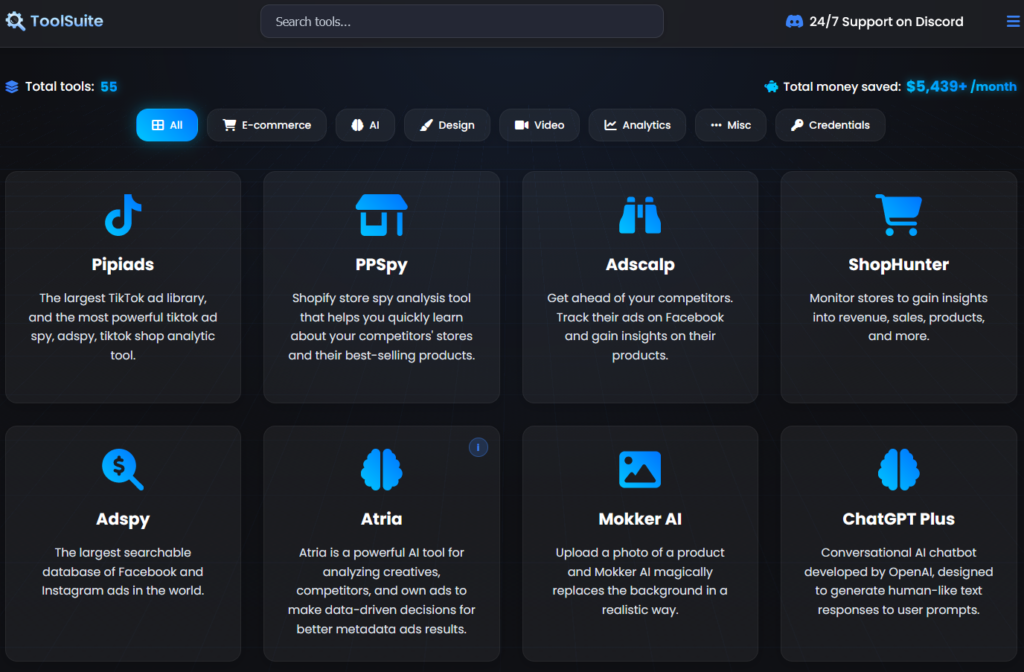
ToolSuite VIP Dashboard
3. ToolSuite VIP Pricing
Compared to buying similar tools individually, bundled access like ToolSuite VIP can reduce monthly costs by a noticeable margin. For users who regularly rely on research, ads, automation, and creative tools, individual subscriptions can easily add up to $150–$300 or more per month. A bundled setup is often priced much lower than that, which is where most of the cost savings come from.
| Plan | Who It’s For | Key Details | Price | Get Access |
|---|---|---|---|---|
| Monthly VIP | New users & short-term use | Full access to all included tools with monthly billing. Suitable for users who want to test the platform before committing. | $29.95 / month | Get Access |
| Lifetime VIP | Long-term users | One-time payment with continued access to current tools and future updates, as long as the service remains active. | $179.95 one-time | Get Access |
Note: Pricing may change from time to time, especially during promotions, so it’s best to check the official access page for the most up-to-date rates.
4. ToolSuite VIP Promo Codes & Deals
ToolSuite VIP occasionally offers discounts through limited-time deals or promo codes. These are usually applied during checkout and may vary depending on the plan you choose. Some offers are automatic, while others require entering a code before completing payment.
💡 Tip: Click the deal button or coupon code below to apply the ToolSuite VIP discount during checkout.
50% Off ToolSuite VIP Lifetime Access
Get lifetime access to ToolSuite VIP at 50% off with this limited-time deal.
View Deal20% Off Monthly Plan
Get 20% off on monthly plans when you apply this coupon code at checkout.
CODE: SAVE20
Redeem Now Coupon code copied!5. ToolSuite VIP: Video Walkthrough
The video below provides a complete ToolSuite VIP review and shows how it is used in real time — including how the dashboard works, how tools are accessed, and what limitations look like in day-to-day use.
6. ToolSuite VIP: Potential Limitations
While ToolSuite VIP can be very useful, there are some limitations that I think anyone considering it should know:
- Shared account limits: One of the main things I noticed is that the tools are accessed through shared accounts. This means there can be usage caps on certain tools. For example, if a tool has a limit on searches, queries, or exports, you might hit it occasionally. When that happens, support usually resets access, but it can be a small interruption in your workflow.
- Not ideal for teams: If multiple people in a team want to use the same tools at the same time, the shared setup may cause conflicts or slowdowns. This bundle seems better suited for individual sellers or small teams.
- Tool availability may change: The list of tools included in the subscription is not fixed. New tools are added over time, but occasionally some tools might be removed. For someone who relies heavily on a specific tool, this can be a factor to watch.
- Occasional performance quirks: From what I’ve seen in community discussions, some tools can be a bit slow or fail to load occasionally. It’s not frequent, but it’s something to keep in mind if you depend on the tools for daily operations.
- Best for multi-tool users: Most users, including myself, feel that ToolSuite VIP really shines if you use several tools regularly. If you only need one or two, it might not offer as much value.
Overall, these limitations don’t necessarily make ToolSuite VIP unusable, but being aware of them can help set realistic expectations before subscribing.
Final Verdict – Is ToolSuite VIP Worth It?
After spending time with ToolSuite VIP and looking at real user feedback, here’s my take:
ToolSuite VIP works best as a convenience upgrade, not a magic replacement for every tool out there. If you’re already using a mix of tools for research, ads, automation, and content, having them in one place can make day-to-day work feel a lot simpler. It’s something that’s better tested than overthought — a short trial is usually enough to see if the tools you rely on fit your flow. For anyone tired of managing too many subscriptions and logins, ToolSuite VIP can be an easy way to streamline things without fully committing to individual tools.
